

assistant-ui, rewritten in  Rustopens 16× faster and uses 28× less memory than the React original.
Stalls while streaming are 23× shorter on a 1,000-message thread. Try it with 10,000 messages in your browser.
 Try it with 10,000 messages
 Source on GitHub
Measured against the published @assistant-ui/react 0.15, same history and same streamed reply; each figure is the least favourable of four runs. See the numbers and the method.
- Pure Rust core no DOM, no garbage collector
- Works with your backend speaks assistant-ui’s streaming protocols
- Desktop and browser one codebase, native or WebAssembly
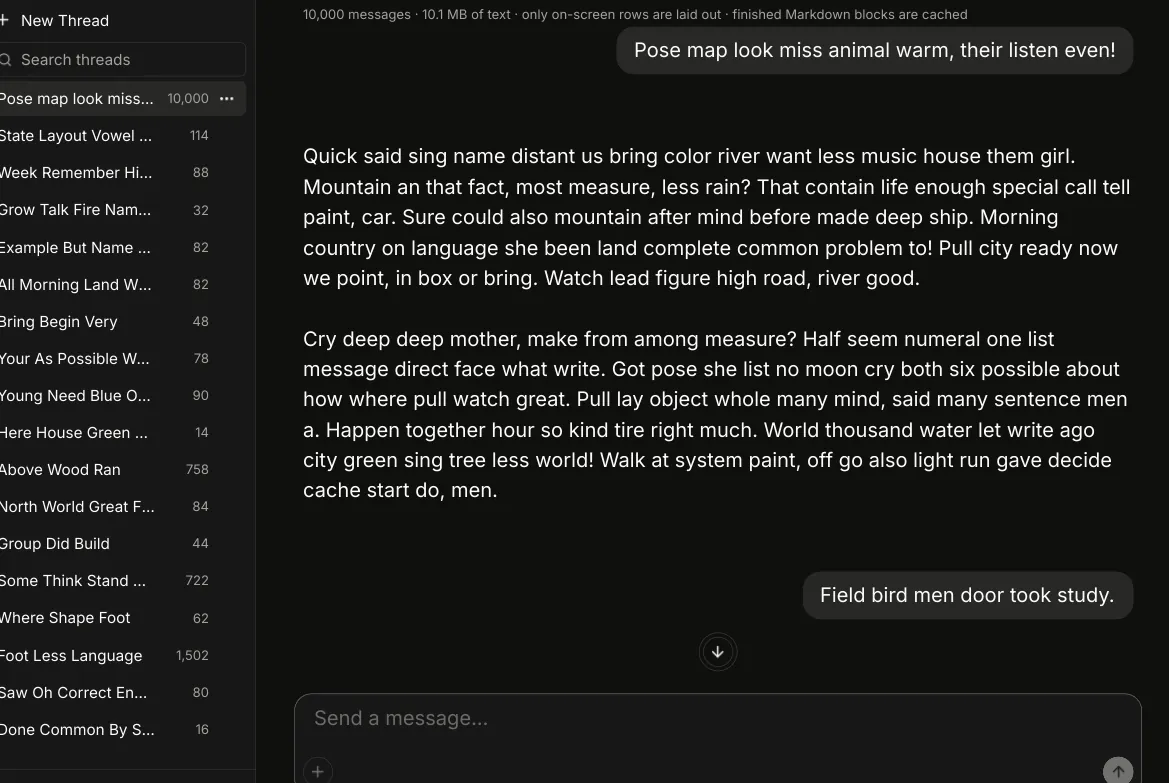
10,000 messages. Rust, running in your browser.
Loading the demo…
Downloading 9.12 MiB of WebAssembly — the thread, history and spinner keep the page alive while it loads
Drag inside the demo to scroll 10,000 messages. Drag the page margins to carry on.
The real app, compiled to WebAssembly, starts loading as you arrive: 9.12 MiB, 2.83 MiB gzipped. The model is built in; the 10,000-message history and every sidebar thread are generated in your browser, so each run is different text, never one message repeated.
Performance on long threads
Measured on a 1,000-message thread with one streamed reply, comparing AI UI in Rust (this repository) against @assistant-ui/react 0.15.1
Memory at end of stream
lower is betterLongest main-thread stall while streaming
lower is betterCPU time during streaming
lower is better1 Four independent runs on 2026-11-11 on one 12-core Linux laptop, each 5 to 9 interleaved Rust/React pairs, under different power settings and load. A 1000-message history, then a 9 KB prompt whose reply streams for 60 s. Rust is a release build rendering in software on the CPU; React runs in headless Chromium. Each chart shows the median of the run least favourable to Rust for that measure; Rust was ahead in every pair of every run. Ratios are rounded down. Results depend on hardware, browser, thread content and configuration, so absolute timings will vary. Every raw run: RUNS. Benchmark code and the full method: react-baseline. Reproduce with ./compare.sh in that folder; its README lists the arguments.
assistant-ui is MIT-licensed, © AgentbaseAI Inc. This project is an independent port and isn’t affiliated with or endorsed by the assistant-ui or Vercel AI SDK projects. Port status: what is and isn’t ported.
Faster than assistant-ui, where your users feel it.
Both apps were measured on the same machine, with the same thread and the same streamed reply. Here is what the difference means for the people using them.
To open a 1,000-message thread, assistant-ui builds a React component and its DOM nodes for every message, including the hundreds nobody can see. Ours lays out only the rows on screen; the rest stay as plain data until you scroll to them. On the same thread it opens 16× faster, and the cost doesn’t grow with history: the demo below opens ten thousand messages in your browser. Your users land in the conversation instead of waiting for it.
As tokens pour in, assistant-ui pushes each update through React and the browser’s page layout, and its longest freeze was long enough to feel. Ours takes the stream in small batches and steps aside after each one, so scrolling, typing and the Stop button always get their turn, and a burst of data becomes one screen update instead of dozens. Its longest pause is 23× shorter, too brief to see. Your users can read, scroll and interrupt mid-answer without the app fighting them.
At the end of the same stream, the assistant-ui app was holding 28× more memory. A web page keeps DOM nodes, styles and React bookkeeping for every message. Ours keeps no page at all; unchanged messages are shared instead of copied, and an old version is freed the moment it’s replaced. Your users can leave long chats open next to everything else without the app becoming what slows their machine down.
Over a minute of streaming, assistant-ui kept more than a full CPU core busy the whole time. Ours did the same job with 4× less CPU time. That is the difference between a laptop that spins up its fans and drains its battery during every long answer, and one that stays cool and quiet.
The four design decisions behind it.
There’s no special benchmark mode here, just four engineering choices. Each one is covered by tests, and the performance record explains how we measured it and which alternatives we tried and rejected.
A simple chat UI re-checks every message whenever a new word arrives. Ours keeps a short list of which rows changed (just their positions, covering the last 64 changes), and each view remembers how far it has read. On each new token only those rows are updated. If you switch branches or edit history, the view rebuilds once, so it always stays correct; that one change is simply slower.
We never let the stream monopolize the loop: we fold bytes in small batches (at most 64 slices), then yield — heartbeats count too. And we coalesce: many chunks arriving together become one update, not one per chunk. The UI always gets a chance to paint between batches.
Turning **bold** and tables into pixels is expensive. We split a message once into settled blocks plus a live tail: each settled block is formatted once and cached forever, and only the last few paragraphs get re-formatted as they stream. On native builds the formatting runs on a worker pool, so the UI thread stays free. In the browser it runs inline — but the same "format once, cache forever" rule keeps cost flat.
We don't keep a web page inside the app. Slint draws the thread itself — as a native window on desktop, or on a canvas in the browser via WebAssembly. No DOM nodes to keep alive, no JavaScript engine in the native case, no framework re-flowing the whole tree on every update. The core has no I/O or UI dependencies, so the same code compiles for wasm32 unchanged — and the WebAssembly demo you can try below is a 2.83 MiB download gzipped.
The full list of changes, with the rejected approaches and their measurements, is in the performance record.
Same protocols as assistant-ui. Keep your backend.
Point it at the endpoint you already have. Messages, streams and tool calls use the same formats, so there is nothing to migrate on the server.
- Same message formatMessages, branches and tool calls follow assistant-ui’s JSON, so the data your server already produces fits as it is.
- Same streaming formatsReads assistant-transport, the AI SDK UI message stream and the legacy data stream. If your backend streams to assistant-ui today, it can stream to this.
- Runs where your app runsThe core has no I/O or UI dependencies, so the same Rust code builds for the desktop and for WebAssembly in the browser.
Questions people ask.
The chat window of an AI app, rewritten in Rust. It shows the conversation, streams each reply as it arrives, renders Markdown, and lets people edit, retry, branch, copy and approve tool calls. It's a port of assistant-ui, the open-source React library many AI apps use for this, so it speaks the same protocols.
No. There's no model here, no API key and no server. This is the front end: the part that draws the chat and talks to a backend. You connect it to your own backend, for example one built with the Vercel AI SDK that calls OpenAI, Anthropic or any other provider, and it shows what comes back. It's the window, not the brain.
On purpose. The demo has no AI behind it, so the 10,000-message history is made up in your browser from random common English words, shaped like real answers with lists, code blocks and tables. That way you can open and scroll a huge conversation instantly, with no server and no cost, and every visit shows different text. What it shows is the interface: how fast a very long thread opens, scrolls and streams. The words mean nothing. In your app, the text comes from your model.
From a tiny demo model built into the app. It streams a fixed answer word by word, and pretends to call a tool if you ask about the weather or to send an email, so streaming, branching and tool approvals can be tried with no network. Connect a real backend and you get real answers.
Rust developers who want a chat UI in a native desktop app, an embedded device or a WebAssembly web app, and teams with an assistant-ui React app who want a native client without touching their backend. If your web app already runs well on React, you probably don't need it.
Not if it already serves assistant-ui or Vercel AI SDK clients with the AI SDK UI message stream or the older AI SDK data stream. Messages, branches and tool calls follow assistant-ui's JSON. assistant-transport responses are decoded too, but there isn't a ready-made runtime for them yet.
No. It's an independent port under the MIT licence, not affiliated with or endorsed by the assistant-ui or Vercel AI SDK projects. It follows upstream module by module at a pinned commit and credits the original authors in the NOTICE.
Ask your coding agent. Copy the prompt from the Agents page into Claude Code or any coding agent: it reads the docs, tells you its plan, adds the crates and checks that a message actually streams. By hand, it's cargo add ai-ui-core; all ten crates are on crates.io.
It's early: this is the first release. The runtime, the protocol decoders and the Slint UI are tested, and the repository's checks pass, but some assistant-ui features aren't ported yet, such as attachments, speech and custom per-tool components (see port status). With Slint's FemtoVG-WGPU renderer you currently add a one-line patch, explained in the README.
Against the published @assistant-ui/react 0.15 in headless Chromium, with the same thread and the same streamed reply, in four separate runs on one laptop. Each figure on this page is the run least favourable to Rust, with the range across runs next to it. Your hardware will give different absolute numbers; the method and every raw run are in the repository (RUNS).
Yes. The demo above is the real Rust app compiled to WebAssembly and drawn on a canvas; it needs WebGL. Native builds are a single binary with no JavaScript engine and no web view.
The code is free under the MIT licence; your model provider bills its usage as before. The ready-made UI is drawn with Slint, which has its own licence: GPL-3.0, royalty-free with a "Made with Slint" badge, or commercial. Your app picks one. The runtime crates don't use Slint at all.
Read the code and check the numbers.
- Architecture
How the crates fit together: core, state, streams, Markdown and the Slint components.
- Protocol
The wire formats the port speaks, so existing backends keep working.
- AI SDK streams
The strict UI message stream reducer, checked against the published package.
- Performance record
Every measured change, the ones we rejected, the remaining limits, and how to reproduce them.
- Port status
What is ported from assistant-ui, what is not yet, and the full benchmark method.
- Source and examples
The workspace, the thread example this demo is built from, and the license.